Appendix J — The formats of executable files
Type gcc hello.c and out comes a.out. Run that file and the program runs. What lies in between? Where chapter 17 covered “translation” and chapter 56 covered “joining together”, this appendix looks at the result — one file — and how it is built.
There are many formats and the specifications are thick. But there is a reason you need not read them. The questions the loader asks a file are the same whatever the format. Know those questions and you can start the story from the first few bytes of any format.
Platform note. what this appendix rests on
w32app.exe — which program it is has nothing to do with the story. The formats themselves are defined by their publishers (ELF (executable and linkable format): the System V ABI (application binary interface); PE: Microsoft’s PE/COFF specification), and what is written here belongs to the opening pages of those.The four questions a loader asks a file#
Running a file comes down to the kernel and the loader reading it and setting up memory. Four questions get asked.
| Question | What it settles | Where the format keeps it |
|---|---|---|
| what goes where | which address the code and data land at | program headers (ELF), section table (PE) |
| where does it start | the address of the first instruction | the entry point field |
| what else is needed | libraries that must come along | PT_INTERP and the dynamic table (ELF), the import table (PE) |
| how are addresses fixed | the places to correct when it lands elsewhere | the relocation table |
Table 105.1 — Four things an executable format must answer
How a format answers these four is its history. Answer them by convention and no format is needed at all (.COM); write the answers into the file and the format grows (ELF, PE).
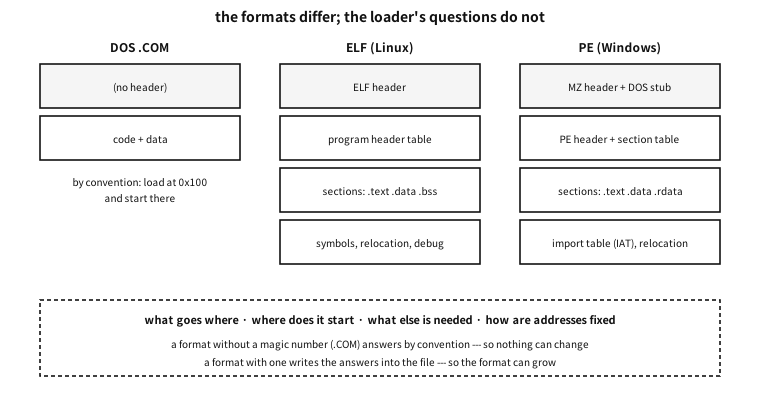
Figure 105.1 — The formats differ; the loader’s questions do not.
A format with no header — the DOS .COM#
The simplest answer is “do not ask”. A .COM file has no header. Its first byte is the first instruction; the loader copies the whole thing to a fixed place (0x100 bytes past the start of the segment) and jumps there. Those first 0x100 bytes are where DOS keeps its own table (the PSP).
Which makes a .COM this kind of thing.
- It cannot exceed one segment. Code, data and stack must all fit in 64 KiB.
- There is no relocation. It always lands in the same place, so nothing needs fixing.
- There is no format check. Any file can be “run” — and the machine usually stops.
★ In its day that simplicity was a virtue. On a machine with one place to load into and one program running, convention as format was enough. Formats grew because machines began loading many programs at once, each somewhere different.
MZ — the first header DOS added#
Once programs outgrew 64 KiB they needed several segments, and with that came numbers that must be corrected depending on which segment they landed in. A header was added to hold that list. That is the DOS executable beginning with MZ (the initials of Mark Zbikowski).
The header holds things like: how many pages the file is, how many relocation entries there are, what CS:IP and SS:SP should start as. It is the first format in which the file itself answers the four questions of Table 105.1.
And remarkably, that header is still alive.
the first 128 bytes of a present-day Windows executable
!This program cannot be run in DOS mode.
In practice. a Windows program of 2026 still speaks to DOS
The text above was taken straight from the front of a modern 64-bit Windows executable that was on this machine. Today’s .exe still begins with MZ, and behind it sits a small DOS program (a stub) that prints “This program cannot be run in DOS mode” and exits. The real header comes after it, and a field of the MZ header points at that place.
The reason is one. It was the only way to tell an old loader “I am a format you recognise, but I am not yours.” Compatibility is left behind as fossils like this.
a.out — the first Unix format, and its limit#
The name will be familiar: with no name given, gcc still produces a.out. That name was the name of a format — assembler output.
a.out writes one header holding the sizes of code, data, .bss and the symbol table, plus the entry point, and stops. Even its magic numbers were three simple octal values (0407, 0410, 0413 — writable code, read-only code, page aligned).
Then in the late 1980s shared libraries arrived and the format hit a wall. With exactly three sections nailed down, there was nowhere to put a new kind of data. Extending it meant adding a field to the header, which would break older tools.
★ What to take from this is not the detail but the design lesson. Make what has to grow a list of named sections, and make what cannot grow a fixed field. Every format since has gone that way — COFF, PE and ELF all name their sections and do not fix the count.
COFF, and its descendant PE#
After a.out came COFF (Common Object File Format), used by Unix System V, which introduced named sections and a table of them. On the Unix side ELF soon displaced it, but COFF survived a very long time elsewhere — because Microsoft took it and extended it. The result is PE (Portable Executable).
A PE file looks like this: the MZ header and DOS stub at the front, then the PE\0\0 signature and the COFF header, then the section table. We can read one with our own tool.
examples-en/apx-formats/run.sh
#!/bin/sh
# 실행 파일 형식 시연 --- 세 가지 형식을 *직접 만들어* 같은 질문을 던진다.
#
# ★ 왜 스크립트인가 --- `read_headers` 는 파일을 인자로 받는다. 그리고 그 파일들이
#   먼저 있어야 한다: PIE 실행 파일, 고정 주소 실행 파일, 그리고 윈도우 실행 파일.
# ★ 윈도우 파일은 *이 자리에서 만든다.* 기계에 있던 남의 프로그램을 가져다 쓰면
#   재현되지 않고, 남의 사정이 책에 새어 든다. mingw 가 없으면 그 줄만 건너뛰고
#   *건너뛰었다고 말한다* --- 조용히 빠지면 독자는 형식이 둘뿐인 줄 안다.
set -eu
cd "$(dirname "$0")"
cc=${CC:-gcc}
win=x86_64-w64-mingw32-gcc

$cc -std=c23 -Wall -Wextra -O0 -o ./rh read_headers.c
$cc -std=c23 -Wall -Wextra -O0 -o ./pie ../apx-elf-segments/elf_segments.c
$cc -std=c23 -Wall -Wextra -O0 -no-pie -o ./fixed ../apx-elf-segments/elf_segments.c

files="./pie ./fixed"
if command -v "$win" >/dev/null 2>&1; then
    printf 'int main(void){return 0;}\n' > ./w32app.c
    "$win" -O0 -o ./w32app.exe ./w32app.c
    files="$files ./w32app.exe"
else
    echo "(no Windows cross-compiler here: the PE example is skipped)"
fi

./rh $files
rm -f ./rh ./pie ./fixed ./w32app.c ./w32app.exe
Output
(no Windows cross-compiler here: the PE example is skipped)
./pie
  magic    : 7f 45 4c 46
  format   : ELF
  width    : 64-bit
  byte order: little-endian
  kind     : ET_DYN (shared object / PIE)
  entry    : 0x10c0
./fixed
  magic    : 7f 45 4c 46
  format   : ELF
  width    : 64-bit
  byte order: little-endian
  kind     : ET_EXEC (fixed address)
  entry    : 0x4010b0
The same program asked the same questions of three files and found the answers in a different place in each. The third is the Windows executable — notice it is read in two layers: it begins with MZ, but the real header is at file offset 0x80.
Three things worth knowing about PE.
| What | What it does |
|---|---|
| the import table (IAT) | a list recording “I need CreateFileW from kernel32.dll”. The loader fills in the real addresses — the same job as ELF’s PLT and GOT |
| the base relocation table | the places to fix when it could not be loaded at the preferred address. ASLR (address space layout randomization) needs this |
| the subsystem field | console or GUI — and value 10 means a UEFI application, with 11 to 13 the UEFI drivers and ROM |
Table 105.2 — Three things to know about PE
★ That last row joins this appendix to the next. The .efi files UEFI firmware runs are in PE format. A program that runs before any operating system wears the same clothes as a Windows executable. The booting story continues in the appendix on how a machine wakes up.
ELF — two lists#
Linux and today’s Unix-like systems use ELF (Executable and Linkable Format). The heart of ELF is that the same file is seen through two lists.
- The section table — the linker’s eye.
.text,.data,.bss,.rodata, the symbol table, relocations, debug information. The list seen in chapter 88. - The segment table (program headers) — the loader’s eye. “Load this range at this address with these permissions.”
One file, two lists, overlapping. Once linking is done the program runs without the section table (strip removes it), while without the segment table it will not run at all.
examples-en/apx-elf-segments/elf_segments.c
/* 링커가 만드는 「구역」과 로더가 읽는 「조각」은 다른 목록이다.
   여기서는 로더가 보는 쪽 --- 프로그램 헤더 --- 을 제 실행 파일에서 읽는다. */
#include <stdio.h>
#include <stdint.h>
#include <string.h>

int main(void)
{
    FILE *f = fopen("/proc/self/exe", "rb");
    if (!f) { perror("open"); return 1; }

    unsigned char eh[64];
    if (fread(eh, 1, sizeof eh, f) != sizeof eh) return 1;
    uint64_t phoff = 0; memcpy(&phoff, eh + 32, 8);
    uint16_t phentsize, phnum;
    memcpy(&phentsize, eh + 54, 2); memcpy(&phnum, eh + 56, 2);

    printf("%u program headers\n\n", phnum);
    printf("%-12s %-8s %10s %10s  %s\n", "kind", "perms", "in file", "in memory", "note");
    for (unsigned i = 0; i < phnum; i++) {
        unsigned char ph[56];
        if (fseek(f, (long)(phoff + (uint64_t)i * phentsize), SEEK_SET) != 0) break;
        if (fread(ph, 1, sizeof ph, f) != sizeof ph) break;
        uint32_t type, flags; uint64_t filesz, memsz;
        memcpy(&type, ph, 4); memcpy(&flags, ph + 4, 4);
        memcpy(&filesz, ph + 32, 8); memcpy(&memsz, ph + 40, 8);

        const char *name;
        const char *memo = "";
        switch (type) {
        case 1: name = "PT_LOAD";    memo = "load this as it is"; break;
        case 2: name = "PT_DYNAMIC"; memo = "the table the dynamic linker reads"; break;
        case 3: name = "PT_INTERP";  memo = "* the name of the program that will load me"; break;
        case 4: name = "PT_NOTE";    memo = "notes such as the build id"; break;
        case 6: name = "PT_PHDR";    memo = "this table itself"; break;
        case 0x6474e551: name = "GNU_STACK"; memo = "whether the stack is executable"; break;
        case 0x6474e552: name = "GNU_RELRO"; memo = "read-only after linking"; break;
        default: name = "other"; break;
        }
        char perm[4] = { flags & 4 ? 'r' : '-', flags & 2 ? 'w' : '-', flags & 1 ? 'x' : '-', 0 };
        printf("%-12s %-8s %10llu %10llu  %s\n", name, perm,
               (unsigned long long)filesz, (unsigned long long)memsz, memo);

        if (type == 3) {   /* PT_INTERP 는 문자열 하나를 담는다 */
            uint64_t off; memcpy(&off, ph + 8, 8);
            char buf[128] = { 0 };
            long save = ftell(f);
            fseek(f, (long)off, SEEK_SET);
            fread(buf, 1, sizeof buf - 1 < filesz ? sizeof buf - 1 : (size_t)filesz, f);
            fseek(f, save, SEEK_SET);
            printf("%-12s %-8s %10s %10s  → \"%s\"\n", "", "", "", "", buf);
        }
    }
    fclose(f);

    printf("\nnote: where a piece is larger in memory than in the file,\n");
    printf("      that difference is .bss --- there is no reason to store zeros.\n");
    return 0;
}
Output
14 program headers

kind         perms       in file  in memory  note
PT_PHDR      r--             784        784  this table itself
PT_INTERP    r--              28         28  * the name of the program that will load me
                                             → "/lib64/ld-linux-x86-64.so.2"
PT_LOAD      r--            1968       1968  load this as it is
PT_LOAD      r-x            1789       1789  load this as it is
PT_LOAD      r--             868        868  load this as it is
PT_LOAD      rw-             640        648  load this as it is
PT_DYNAMIC   rw-             480        480  the table the dynamic linker reads
PT_NOTE      r--              32         32  notes such as the build id
PT_NOTE      r--              36         36  notes such as the build id
PT_NOTE      r--              32         32  notes such as the build id
other        r--              32         32
other        r--              44         44
GNU_STACK    rw-               0          0  whether the stack is executable
GNU_RELRO    r--             560        560  read-only after linking

note: where a piece is larger in memory than in the file,
      that difference is .bss --- there is no reason to store zeros.
Three things to read here.
First, PT_INTERP holds the name of “the program that will load me”. The path of the dynamic linker sits in the file as a string. The kernel reads that name and starts that program instead — so a dynamically linked executable is not started by the kernel directly.
Second, only the last PT_LOAD is larger in memory than in the file. That difference is .bss. There is no reason to store zeros for globals that start at zero, so only the size is recorded and the kernel supplies the zeroed part.
Third, the type is ET_DYN. Today’s distributions default to PIE (position independent executables), so an executable is built as the same kind of thing as a shared library. Which is what lets it be loaded at a different address each time (ASLR).
Q. If .bss is not in the file, what does it have to do with the program’s size?
A. A global whose initial value is not zero must have that value stored in the file, so the file grows. A zero one only makes a size number larger. That is where the embedded rule “put big arrays in .bss” comes from — it saves flash.
A common misconception. the extension decides the format of a file
MZ and PE\0\0. That is exactly what the demonstration above did — it read the magic, not the name.Other formats, and magic numbers#
| Format | Magic | Where you meet it |
|---|---|---|
| ELF | 7f 45 4c 46 (\x7fELF) | Linux, BSD, Solaris — and core dumps |
| PE | 4d 5a (MZ) → PE\0\0 | Windows executables and DLLs, and .efi |
| Mach-O | cf fa ed fe | macOS, iOS |
| universal binary | ca fe ba be | several architectures in one file (Mach-O) |
| Java class | ca fe ba be | the JVM — the magic collides |
| WebAssembly | 00 61 73 6d (\0asm) | browsers and runtimes |
| a.out | octal magics such as 07 01 | old Unix — only the name survives |
Table 105.3 — Formats told apart by their first few bytes
In practice. two formats using the same magic
0xCAFEBABE is the magic of a Java class file and also of a Mach-O universal binary. Tools really have confused the two, and tell them apart by looking at the following field (in a universal binary it is “how many architectures”, where Java has its version number). A magic number is a convention, not a registered name — which is why the demonstration above offered two answers on that line.What to take from this#
Recap
- The formats differ; the questions do not — what goes where, where it starts, what else is needed, how addresses are fixed.
- Answer by convention and no format is needed (
.COM); write the answers into the file and the format grows. a.outdied because it had nowhere to grow. Named sections were the answer.- As today’s
.exestill begins withMZ, compatibility is left behind as fossils. - ELF sees one file through both the linker’s eye (sections) and the loader’s (segments).
- The kind of a file is decided by its first few bytes, not by its name.