6 Dialogs, a license, and starting the program
Goal: an installer with pages - welcome, a license the user must accept, a choice of folder, progress, finished - that offers to start Hello at the end.
6.1 The source#
LICENSE.txt and banner.bmp (a picture about 493 x 58 pixels) are next to the source.
# tutorial 06: hello.toml
format = 1

[package]
name = "Hello"
manufacturer = "Example Software"
version = "$(VERSION)"
arch = "x64"
upgrade-code = "{3F2A6C1D-8B4E-4F7A-9C2D-5E6F7A8B9C0D}"
ui = "installdir"
license = "LICENSE.txt"

[define]
VERSION = "1.4.0"

[ui]
banner = "banner.bmp"
launch = "file:Hello"
launch-args = "--first-run"
launch-checked = true

[ui-text.WelcomeText]
text = "This will install [ProductName] [ProductVersion]. Close Hello if it is running."

[ui-text.ExitText]
text = "[ProductName] is ready. Thank you for installing it."

[dir.INSTALLDIR]
path = "$(ProgramFiles)/Hello"

[file.Hello]
dir = "INSTALLDIR"
source = "dist/hello.exe"

[shortcut.StartMenu]
dir = "Programs"
name = "Hello"
target = "file:Hello"
6.2 Choosing a set of pages: ui#
ui in [package] picks one of the built-in dialog sets:
ui | When installing | When run again after installation |
|---|---|---|
| (none) | Windows Installer's own small progress window only | the same |
basic | progress, then finished (or an error) | progress, finished |
minimal | welcome, the license (if any), progress, finished | repair or remove |
installdir | welcome, license, install folder (with a folder browser), ready, progress, finished | repair or remove |
features | as installdir, plus a tree of features and the disk space they need (chapter 8) | repair, change or remove |
Every set also has the pages Windows needs when something happens: "Are you sure you want to cancel?", an error message, "these programs use files that must be replaced" (files in use), and "not enough disk space". A package with dialogs still installs silently with /qn: every page only collects values that have defaults.
6.3 The license: license#
license = "LICENSE.txt" adds a license page after the welcome page. Next stays disabled until "I accept the terms of the license agreement" is ticked. The file may be:
.txtor.md- shown as plain text; Korean, other scripts and emoji are kept;.rtf- shown as it is, with its fonts and formatting (make it in WordPad or Word).
The license text is stored in the package when it is built; the user does not need the file.
6.4 The install folder#
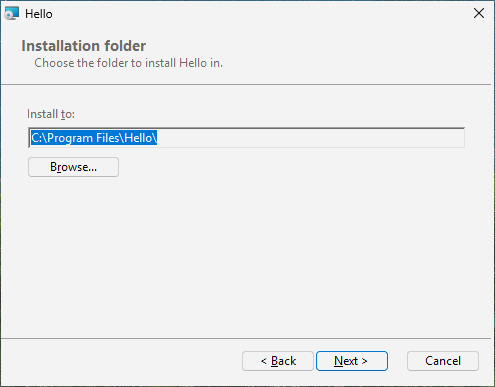
With installdir or features, a page shows the install folder with a Change button that opens a folder browser. The folder the user picks becomes INSTALLDIR, and every dir built on INSTALLDIR moves with it. To let the user change another dir, name it: install-dir = "AppDir" in [ui]. From the command line the folder is given as a property:
msiexec /i hello.msi INSTALLDIR="D:\Tools\Hello"6.5 A picture at the top: banner#
banner = "banner.bmp" puts a picture in the strip at the top of every inner page (Windows Installer draws a BMP; about 493 x 58 pixels). Without it the strip is plain white.
6.6 Your own words: [ui-text.ID]#
Every text on the built-in pages has an ID; [ui-text.ID] replaces one. The IDs are listed in the Reference part (Dialogs); WelcomeText and ExitText are the sentences on the first and the last page. Texts are formatted strings: [ProductName], [ProductVersion] and [Manufacturer] are replaced, and a literal square bracket is written [\[]. In a button's text, & marks the letter that works with Alt: &Next is Alt+N.
6.7 Starting the program at the end: launch#
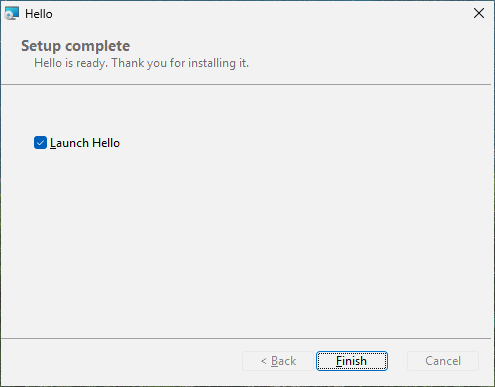
launch = "file:Hello" puts a tick box "Launch Hello" on the finished page (ticked, unless launch-checked = false); launch-args are the program's arguments. If it is ticked, Finish starts Hello - with the rights of the user who ran the installer, not the installer's administrator rights - after a first installation or an upgrade, but not after a repair or a removal, and never in a silent installation.
6.8 Saving the log: save-log#
The finished page - and the pages for a cancelled or failed installation - have a Save log... button at the bottom left. It opens the usual Save As window and saves a copy of what Windows Installer wrote about this run: every file, registry value and action, and on a failed page the error that stopped it. That is the file to send when someone asks why an installation went wrong. For it, the package asks Windows Installer to keep a log of every run (MsiLogging), in the user's temporary folder, unless msiexec /l names one. save-log = false in [ui] leaves the button out, and with it the logging.
6.9 Try it#
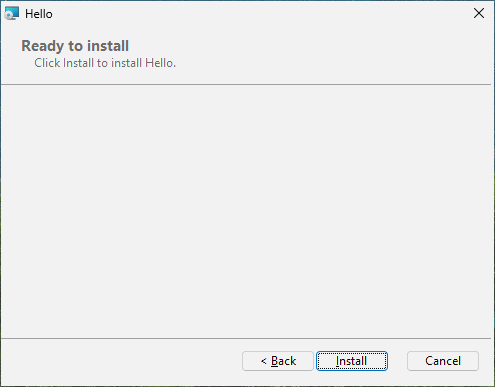
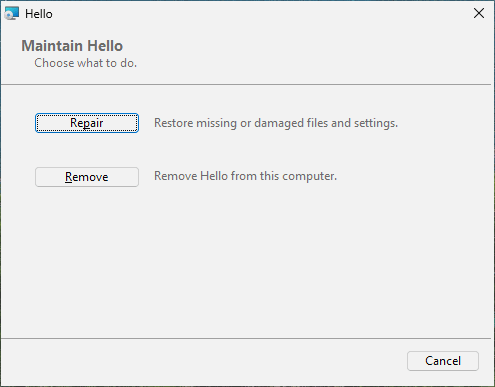
Double-click hello.msi: welcome (with your text and the banner), the license (Next is grey until you tick the box), the install folder, ready, progress, finished with "Launch Hello" ticked. Run it again after installing: a page offers Repair and Remove.
![Welcome, with the text of [ui-text.WelcomeText]](img/ch06-welcome.png)
[ui-text.WelcomeText]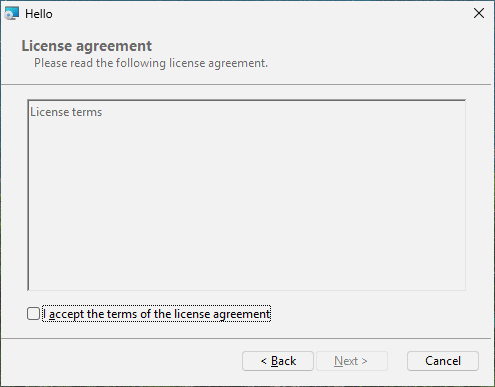
6.10 What happened inside#
A package with dialogs carries them as tables - Dialog, Control, ControlEvent and more - that describe every window, button and text box with its position and what happens when it is pressed. rubrapack writes them from its built-in sets:
C:\work\hello> rubrapack inspect hello.msi Dialog
...
RpBrowseDlg RpCancelDlg RpErrorDlg RpExitDlg RpFatalDlg RpInstallDirDlg RpLicenseDlg
RpMaintenanceDlg RpOutOfDiskDlg RpProgressDlg RpReadyDlg RpUserExitDlg RpWelcomeDlg FilesInUse
(Here only the first column is shown.) The InstallUISequence table says when a page appears:
RpWelcomeDlg	NOT Installed	1230
RpMaintenanceDlg	Installed AND NOT RESUME AND NOT Preselected	1240
RpProgressDlg		1280
RpExitDlg		-1
RpUserExitDlg		-2
RpFatalDlg		-3
The middle column is a condition: the welcome page only when the product is not installed yet, the maintenance page when it is. The negative numbers are special: the page shown at the end after success (-1), after the user cancelled (-2), after a failure (-3). Chapter 9 uses conditions of your own.