8 선택 구성요소: 기능과 사용자의 선택
목표: 무엇을 설치할지 사용자가 고르게 한다. 프로그램 자체는 늘 설치하고, 문서는 보여 주며 표시된 채로 두고, 예제는 보여 주되 표시하지 않고, 진단 부분은 숨겨 두었다가 요청할 때만 설치한다.
8.1 기능#
기능(feature)은 사용자가 고를 수 있는 제품의 한 부분이다: 설치 파일의 트리에서 제목, 설명, 표시가 있는 한 줄이다. 모든 파일은 정확히 한 기능에 속하고, 한 기능에는 파일이 몇 개든 들어갈 수 있다.
8.2 원본#
# tutorial 08: hello.toml
format = 1

[package]
name = "Hello"
manufacturer = "Example Software"
version = "$(VERSION)"
arch = "x64"
upgrade-code = "{3F2A6C1D-8B4E-4F7A-9C2D-5E6F7A8B9C0D}"
ui = "features"
license = "LICENSE.txt"

[define]
VERSION = "1.6.0"

[feature.Main]
title = "Hello"
description = "The program itself."
required = true

[feature.Documentation]
title = "Documentation"
description = "The guide, in the docs folder."

[feature.Samples]
title = "Samples"
description = "Example files to try Hello with."
level = 2

[feature.MoreSamples]
title = "More samples"
description = "Samples in sub folders."
parent = "Samples"
follow-parent = true

[feature.Diagnostics]
title = "Diagnostics"
hidden = true
level = 3

[dir.INSTALLDIR]
path = "$(ProgramFiles)/Hello"
feature = "Main"

[dir.DocsDir]
path = "$(INSTALLDIR)/docs"
feature = "Documentation"

[dir.SamplesDir]
path = "$(INSTALLDIR)/samples"
feature = "Samples"

[dir.MoreSamplesDir]
path = "$(INSTALLDIR)/samples/sub"
feature = "MoreSamples"

[file.Hello]
dir = "INSTALLDIR"
source = "dist/hello.exe"

[files.DocFiles]
dir = "DocsDir"
glob = "dist/docs/**"

[files.SampleFiles]
dir = "SamplesDir"
glob = "dist/samples/*.txt"

[files.MoreSampleFiles]
dir = "MoreSamplesDir"
glob = "dist/samples/sub/*.txt"

[file.Readme]
dir = "INSTALLDIR"
source = "dist/readme.txt"
feature = "Diagnostics"

[shortcut.StartMenu]
dir = "Programs"
name = "Hello"
target = "file:Hello"
8.3 기능 선언하기: [feature.ID]#
| 키 | 뜻 |
|---|---|
title | 트리의 줄 |
description | 그 줄을 골랐을 때 보이는 글 |
level | 1(기본): 기본으로 설치. 2 이상: 보여 주지만 고를 때만 설치 |
required = true | 늘 설치: 트리가 "사용할 수 없음"을 제안하지 않는다 |
parent = "Samples" | 트리에서 다른 기능 아래의 줄 |
follow-parent = true | 부모가 설치될 때 정확히 함께 설치 |
default-when = "OLDPACK" | 기본은 꺼짐(level 이 1보다 큼), 조건이 맞으면 기본으로 켜짐 |
hidden = true | 트리에 아예 보이지 않음 |
기능 ID 는 dir, 파일과 이름 공간을 함께 쓴다: 기능 Documentation 과 폴더 DocsDir 는 ID 가 달라야 한다(아니면 rubrapack 이 RP1301 로 알린다).
8.4 파일을 기능에 넣기: feature#
- dir 에: 그 폴더의 모든 파일이 그 기능에 속한다 -
DocsDir는guide.txt를Documentation에,SamplesDir는sample1.txt를Samples에 넣는다. - 파일이나 파일 묶음에: 그 파일(묶음)이 폴더와 상관없이 그 기능에 속한다 -
Readme는Main의 폴더인INSTALLDIR에 있지만Diagnostics에 속한다.
dir 은 자기 기능을 아래 dir 에 물려주지 않는다: MoreSamplesDir 는 자기 기능을 따로 댄다. 원본이 기능을 하나라도 선언하면 설치되는 모든 것에 기능이 필요하다. 기능이 없는 것은 rubrapack 이 RP1202 로 짚고 멈춘다.
8.5 사용자가 보는 것#
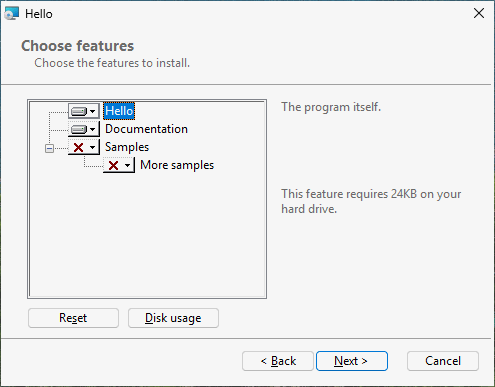
ui = "features" 에서는 약관과 설치 폴더 다음에 "Choose features"(기능 고르기)가 나온다: 트리 하나
[x] Hello                     (끌 수 없음)
[x] Documentation
[ ] Samples
      [ ] More samples        (Samples 를 따라감)
줄마다 메뉴가 있다: "Will be installed on local hard drive"(로컬 하드 드라이브에 설치), "Entire feature will be installed on local hard drive"(하위까지 모두 설치), "Entire feature will be unavailable"(모두 사용할 수 없음). 줄을 고르면 설명과 필요한 디스크 공간이 보이고, "Disk Usage" 는 드라이브마다 공간을 보인다. (이 글들은 Windows 에서 오므로 영어로 남는다.) Diagnostics 는 보이지 않는다.
기본 설치(두 번 누르고 다음, 다음, ...)는 Hello 와 문서를 설치한다.
8.6 명령줄에서 고르기#
기능은 속성으로 고르므로 조용한 설치도 고를 수 있다:
| 명령 | 설치하는 것 |
|---|---|
msiexec /i hello.msi /qn | 기본: Main, Documentation |
msiexec /i hello.msi /qn ADDLOCAL=Samples | 기본과 예제(따라가는 More samples 포함) |
msiexec /i hello.msi /qn ADDLOCAL=ALL | 숨긴 것까지 모든 기능 |
msiexec /i hello.msi /qn INSTALLLEVEL=3 | level 이 3 이하인 모든 기능: 여기서는 전부 |
msiexec /i hello.msi /qn REMOVE=Documentation | 문서를 뺀 기본 |
기능 ID 는 대소문자를 가리고 쉼표로 나눈다: ADDLOCAL=Samples,Diagnostics. required 는 트리만 묶는다: 명령줄의 REMOVE=Main 은 여전히 따른다(Windows Installer 가 그렇게 동작한다).
8.7 나중에 바꾸기#
설치한 뒤 "설치된 앱"은 Hello 에 수정을 보인다. 설치 파일의 유지 관리 페이지가 열리고 변경, 복구, 제거가 있다. 변경은 설치된 것이 표시된 같은 트리를 보이고, 사용자는 부분을 더하거나 뺀다. 설치된 제품에 명령줄로는:
msiexec /i hello.msi ADDLOCAL=Samples
msiexec /i hello.msi REMOVE=Samples
8.8 안에서 무슨 일이 일어났나#
C:\work\hello> rubrapack inspect hello.msi Feature
Feature	Feature_Parent	Title	Description	Display	Level	Directory_	Attributes
...
Diagnostics		Diagnostics		0	3		0
Documentation		Documentation	The guide, in the docs folder.	3	1		0
Main		Hello	The program itself.	1	1		16
MoreSamples	Samples	More samples	Samples in sub folders.	7	1		2
Samples Samples Example files to try Hello with. 5 2 0Display는 트리의 순서다(원본 순서의 홀수). 0 은 기능을 숨긴다.Level은 수준이다. Windows 는 수준이 속성INSTALLLEVEL(1)보다 높지 않은 기능을 기본으로 설치한다.Attributes는 비트 플래그다: 16 은 "없앨 수 없음"(required), 2 는 "부모를 따라감".
FeatureComponents 표는 컴포넌트 - 파일 - 마다 그 기능을 잇는다:
C:\work\hello> rubrapack inspect hello.msi FeatureComponents
...
Documentation	C_a10be66379e69940a2e0
Main	C_185f8db32271fe25f561
Samples	C_a5674982edf0797da30f
...